Zero Line FPV Controls Guide
Master throttle, attitude, guns, and camera modes so every kamikaze approach stays readable.
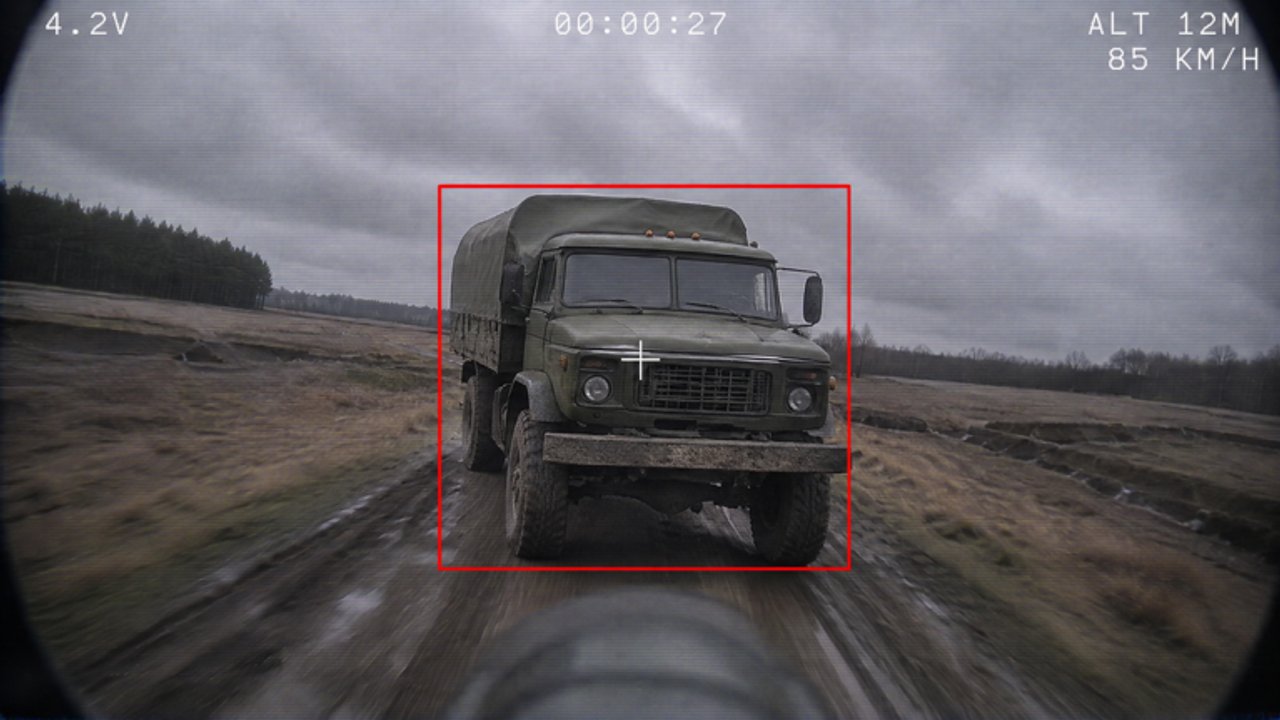
Flying in Zero Line is not the same as walking a Roblox avatar. You are piloting an FPV drone with continuous throttle, pitch, yaw, and roll, plus fire, dive/commit, and camera modes such as night vision (NV) and thermal. This controls guide translates those axes into practical habits for PC, mobile, tablet, and console so your first hours from Getting Started turn into repeatable combat from Combat Tactics.
Exact keybinds can vary with Roblox device templates and your remaps. Treat the sections below as action maps: learn what each axis does, then bind it where your hands already rest. If a patch renames a prompt, the physics of FPV still apply.
The six actions that matter
Throttle
Throttle is climb versus sink authority. Smooth throttle keeps the camera readable; slamming it makes every target swim. Practice holding a steady altitude for ten seconds, then add small climbs and descents without touching yaw. Battery upgrades later extend how long you can afford imperfect throttle, but they never replace discipline.
Pitch
Pitch tips the nose up or down and defines your dive angle into trucks, helicopters, and players. Shallow pitch dives are easier to correct; vertical panic dives look cinematic and miss. For kamikaze practice, pick a distant soft target, set a medium dive angle, and only steepen in the final second.
Yaw
Yaw rotates the drone left/right flat. It is how you line the reticle with a moving player without rolling the horizon into soup. Prefer small yaw taps over holding full deflection. If you constantly overshoot, lower look sensitivity before blaming the drone tier list.
Roll
Roll banks the airframe. Combined with pitch, it shapes curved approaches around cover and heli rotors. New pilots often ignore roll and fly “flat FPS.” Spend a private minute rolling while holding altitude so the motion stops feeling like a bug.
Fire (guns)
Guns exist so you are not forced into a suicide dive every engagement. Use fire to strip enemy drones, finish wounded targets, or create space when a kamikaze line is blocked. Burst instead of panic-holding if your aim wobbles with throttle changes.
Dive / kamikaze commit
The dive is the signature Zero Line moment: commit the airframe into a player, truck, or helicopter. Decide the commit early. Changing your mind mid-dive usually means a dirt pizza. If you need the decision framework for target types, jump to Combat Tactics after you finish this page’s drills.
PC controls — precision default
On PC, bind flight so your non-mouse hand owns throttle and lateral axes while the mouse owns look/aim:
- Keep throttle on an analog-friendly key pair or scroll-adjacent keys you can feather.
- Put yaw on comfortable A/D or Q/E style pairs if that matches your muscle memory — consistency with other games helps, but FPV needs smaller inputs than strafing an avatar.
- Ensure fire and dive/commit are distinct. Misclicking kamikaze when you meant to shoot is a classic first-week tax.
- Mouse sensitivity should be lower than a typical shooter. You are steering a camera through space, not flicking headshots.
PC checklist before ranked-feeling sessions:
- Disable any OS mouse acceleration experiments you forgot about.
- Confirm Roblox window focus so the first dive does not alt-tab.
- Test NV and thermal toggles in a safe hover so you are not hunting keybinds mid-fight.
Mobile and tablet — thumbs, then hardware
Mobile and tablet are fully supported. The challenge is thumb overlap between virtual sticks and camera modes.
- Use the largest practical stick UI the client allows.
- Anchor the device; flying while walking IRL is how drones meet trees in every FPV genre.
- Tablets usually make thermal and NV reads clearer because contrast patches are bigger.
- If you play daily, a clip-on controller often beats pure touch for yaw micro-corrections.
Mobile drill: hover, yaw 90 degrees left, yaw back, climb two “steps,” descend two steps, then a shallow dive into empty ground. Repeat until you can do it without looking at your thumbs.
Console — dead zones and inversion
Console pilots should set dead zones so stick drift does not invent roll. Check look inversion immediately; FPV plus the wrong invert setting feels like the game is haunted.
- Prefer slightly slower look response than arena shooters.
- Map fire and dive to bumpers/triggers you will not confuse under stress.
- Use the second stick for fine aim while the first stick owns translational flight — practice until the split becomes automatic.
After sensitivity changes, do not jump straight into heli hunts. Warm up with the same hover-yaw-dive drill from the mobile section.
Camera modes: normal, night vision, thermal
Zero Line’s optical upgrades — night vision and thermal cameras — change how you read the sandbox.
- Normal — best color and depth cues in daylight; default for learning maps.
- Night vision — lifts dark sessions; watch for bloom and washed edges that hide thin antenna masts or wires of motion.
- Thermal — helps separate warm-looking targets from busy backgrounds; great for trucks and players in clutter, but can flatten some scenery contrast.
Practical rules:
- Switch modes before the final dive, not during the last half-second.
- If thermal confuses you on a bright map, flip back; ego is not a sensor.
- Upgrade path advice for when to buy NV/thermal sits in the Upgrades Guide. Controls skill comes first; sensors multiply good aiming, they do not create it.
Aim and kamikaze approach tips
Lead moving players. Players strafe and jump. Aim where they will be when your drone arrives, not where the thumbnail is now.
Trucks want shallow long approaches. Come in low and committed so last-second bumps still intersect the chassis. High theatrical dives look cool and glance off.
Helicopters need patience. Match energy, avoid rotor panic, and prefer a line that intersects the body. If the heli is juking hard, gun chips or reset — forced kamikazes into empty sky teach nothing.
Enemy drones. Sometimes shooting is correct. A gun trade that leaves you alive preserves battery and mission progress. Save the airframe suicide for high-value static or slow targets when missions demand destroys.
Throttle through the hit. Many misses happen because pilots cut throttle and “drop short.” Maintain energy into the target unless you are deliberately lofting.
One correction rule. On a dive, allow yourself one meaningful aim correction. A second and third usually means you should have aborted.
Sensitivity and comfort baselines
Use these starting points, then tune:
- If you constantly fly past targets, lower look sensitivity 10–15%.
- If tiny yaw adjustments feel impossible, raise it slightly or reduce dead zone.
- If roll induces nausea, lower roll authority binding or avoid aggressive banking until stomach adapts — short sessions help.
- Recheck settings after Roblox client updates; input profiles sometimes reset.
Store your notes in the Tools Hub checklist style: warm-up routine, sensitivity numbers, and which camera mode you prefer per time of day.
Practice routine (10 minutes)
- Hover and hold heading for 20 seconds.
- Box drill: forward, yaw 90°, repeat until you complete a square.
- Climb-descend ladder without yaw.
- Three shallow dives into open ground with one correction max each.
- One gun tracking pass on a moving drone or bot-like target if available.
- Toggle NV and thermal once each while hovering; confirm you can find the toggle blind.
Only then queue “real” fights. This routine pairs cleanly with daily missions from Missions so warm-up time still earns progress.
Troubleshooting common control problems
- Drone feels drunk — lower sensitivity, check dead zones, stop holding full stick deflection.
- Picture tears at range — fly closer or plan antenna upgrades; do not spam yaw hoping the signal improves.
- Cannot see targets at night — practice NV/thermal toggles; buy the optical upgrade when cash allows after battery/propellers.
- Accidental kamikaze — separate fire and dive binds; add a mental confirm word before commit.
- Great aim in hover, terrible in dive — you are fighting throttle. Practice dives with locked throttle plateaus.
If something seems like a true input bug, use Settings → FEEDBACK / BUG. Mention device type (PC/mobile/console), whether it reproduces after rejoin, and whether it started after a patch listed on Updates.
How controls connect to the rest of the wiki
Controls are the foundation under every other guide. Getting Started gets you into the lobby with group cash active. This page makes the drone obey you. Combat Tactics spends that obedience on trucks, helis, and players. Upgrades Guide and the Tier List decide which airframe and parts deserve your boosted cash. Tools keeps the warm-up honest.
Print the mental model: smooth throttle, small yaw, decided dive, deliberate camera mode. Everything else is cosmetics and highlight reels.
Frequently Asked Questions
Quick answers to the most common Zero Line questions.
What are the main Zero Line flight controls?
You manage throttle, pitch, yaw, and roll, plus fire for guns and a dive/commit for kamikaze hits. Camera modes include normal, night vision, and thermal.
Should PC and mobile use the same sensitivity?
No. Start lower than a typical shooter on every platform, then tune. Mobile often needs larger stick UI or a clip-on controller for fine yaw.
When should I use thermal or night vision?
Use NV in dark sessions and thermal when targets blend into clutter. Switch before the final dive and flip back if contrast gets worse for you.
Why do I keep missing kamikaze dives?
Usually steep panic angles, cutting throttle early, or making too many mid-dive corrections. Practice shallow approaches with one correction max.
Where should I go after learning controls?
Open Combat Tactics for target-specific approaches, then Upgrades Guide and Missions so better flying turns into cash and levels.